
Free Schema Markup Generator -Create JSON-LD Structured Data in Seconds
Schema markup is what your pages eligible for rich results, star ratings, and AI citations. Our free schema generator creates valid JSON-LD code for 15+ schema types. No coding. No signup.
Generate Your JSON-LD Schema Code
Select a schema type, fill in the details, and get clean JSON-LD code ready to paste into your website. No developer needed.
Have suggestions or want to add something? Your feedback helps us improve this tool for everyone. If you've got 30 seconds, leave us a quick review on Google 🌟 and keeps us motivated to build more.
How to Generate Schema Markup in 3 Simple Steps
You do not need to know any code. Use this free schema markup generator to create structured data for any page.
- Select a schema type. Choose from 15+ options like FAQ, Product, Local Business, Article, or Organization.
- Fill in the details. Enter your page information, business name, product details, or FAQ questions.
- Copy the JSON-LD code. Paste it into your website head, WordPress footer, or SEO plugin. Done.
This schema generator works for any website. You can test unlimited times. No account needed.
Everything You Get from Our Free Schema Generator
Rich Results Ready
Star ratings, FAQ dropdowns, product prices in search results all require schema. Our generator creates exactly the code Google needs.
AI Overview Signals
Google AI Mode and generative search engines use structured data to understand content. Schema is one of the strongest AI citation signals.
Always Valid JSON-LD
Our schema code generator produces clean, properly formatted JSON-LD. No syntax errors, no missing fields, no guesswork.
Ready in 30 Seconds
Select a type, fill in fields, copy the code. Paste directly into your WordPress, HTML head, or Rank Math custom schema field.
What Is a Schema Generator and Why Is Structured Data One of the Most Powerful SEO Signals?
Schema markup is structured data, a standardized code you add to your website that tells search engines exactly what your content means, not just what it says. Without schema, Google reads your words and makes its best guess. With schema, you tell Google directly: this is a product, this is an FAQ, this is a local business, this is a review. That precision is worth a lot.
When Google understands your content at a structural level, two things happen. First, your page becomes eligible for rich results — those enhanced search listings with star ratings, FAQ dropdowns, product prices, and event details that take up significantly more space on the results page and get dramatically more clicks. Second, your page becomes a much stronger candidate for Google AI Overviews and Google AI Mode citations because AI systems are fundamentally built on structured, machine-readable data, and schema is exactly that.
In 2026, with Generative Engine Optimization (GEO) and Answer Engine Optimization (AEO) reshaping how search works, schema markup has shifted from a nice-to-have into a genuine competitive advantage. Websites with proper schema get cited in AI-generated answers. Websites without it are invisible to those systems regardless of how good their content is.
Nexsolvia’s free schema generator supports all major schema types and produces clean, valid JSON-LD output — the format Google officially recommends. After generating your schema, validate it instantly with our Schema Validator tool to confirm it is error-free and eligible for rich results.
✅ 15+ Supported Schema Types
Once you generate your schema, run it through our Schema Validator to confirm it passes Google’s rich results test. And if you haven’t written your meta tags yet, use our Meta Tag Generator to pair optimized titles and descriptions with your new schema.
7 Schema Markup Mistakes That Block Rich Results
These are the most common errors people make when adding schema to their website. Our schema generator helps you avoid all of them.
- Using the wrong schema type. Local business schema on a blog post, product schema on a service page. Match the type to the content.
- Missing required fields. Every schema type has required properties. FAQ schema needs “acceptedAnswer”. Product schema needs “offers”.
- Invalid JSON syntax. A missing comma or bracket breaks the entire schema. Our generator handles all formatting so you never face this.
- Schema that does not match page content. Google expects your schema to reflect what is actually on the page. Do not add FAQ schema without visible FAQ content.
- Not validating after adding schema. Even a small mistake makes Google ignore everything. Always validate your schema after generating.
- Using deprecated schema properties. Schema.org updates regularly. Our generator uses current properties only.
- Forgetting to add schema to new pages. Schema is not a one-time task. Every new page, product, or article needs its own structured data.
Our free schema markup generator helps you avoid these mistakes. It produces valid code every time. Then validate it with our Schema Validator for extra confidence.
3 Ways to Generate Schema Markup for Your Website
You have options. Pick what works best for your time and skill level.
1. Use Our Free Schema Generator (Fastest)
Select a schema type, fill in the details, copy the code. Get clean JSON-LD in 30 seconds. No coding required. Best for beginners and busy site owners who want correct schema without learning the technical details.
2. Use Google’s Structured Data Markup Helper
Google provides a free tool that lets you tag elements on your page to generate schema. After generating, copy the code and add it to your website. Good for visual learners.
3. Write Schema Manually
If you know JSON-LD syntax, you can write schema directly. This gives you full control but requires technical knowledge. One mistake in syntax can break the entire schema. Use our generator to save time and avoid errors.
For most users, our free schema generator is the fastest and most reliable option. Generate the code, paste it, and move on.
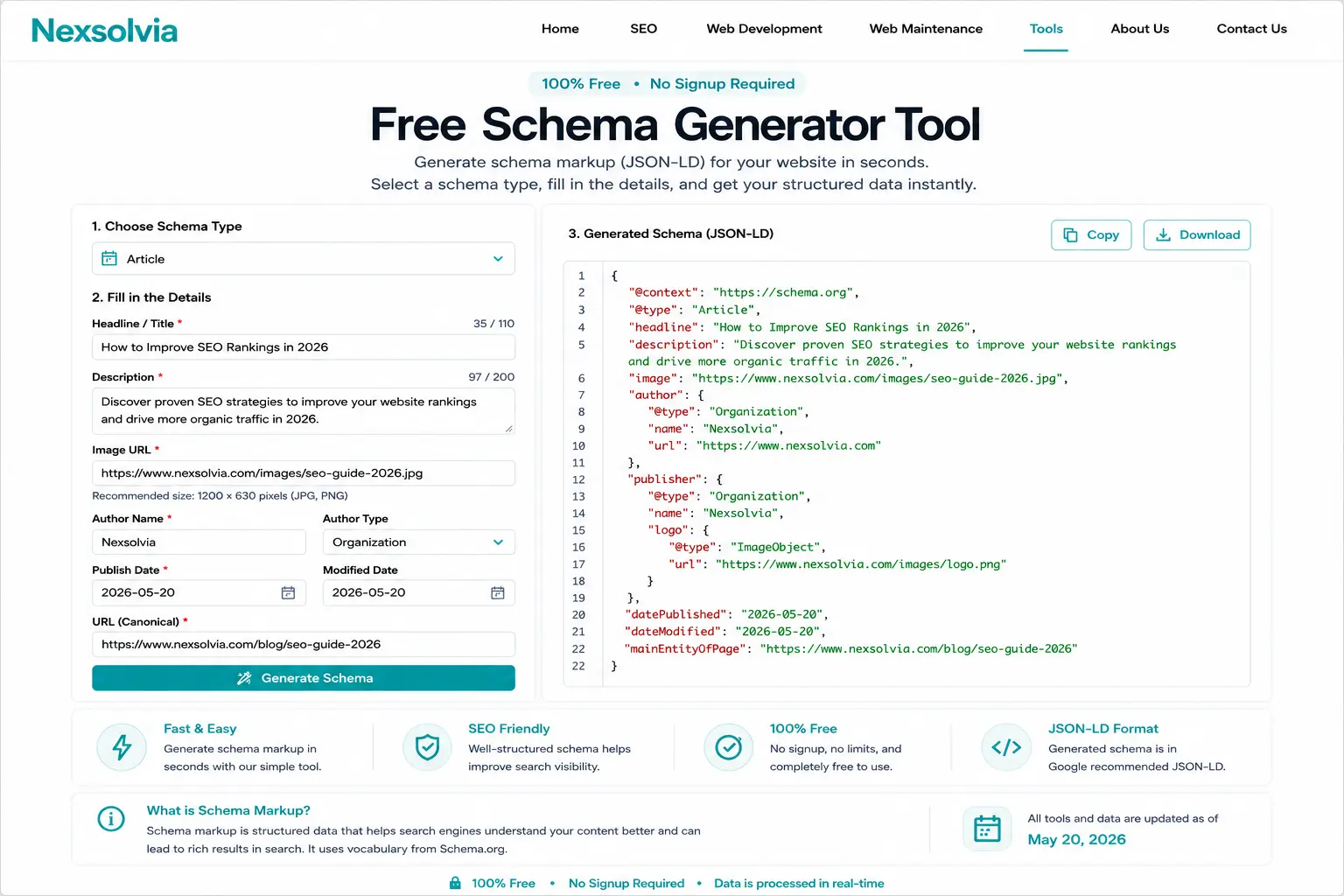
Our free schema markup generator in action — select a schema type, fill in details, get valid JSON-LD code in seconds.