
Free OG Tag Generator Control How Your Links Look When Shared
Every time someone shares your link on WhatsApp, Facebook, LinkedIn, or X what do they see? A blank grey box loses clicks before they even begin. Our free OG tag generator creates Open Graph and Twitter Card tags instantly with a live preview. No signup, no limits.
Generate Open Graph & Twitter Card Tags
Fill in your page details below to generate complete Open Graph and Twitter Card meta tags with a live preview of how your link will appear when shared on social media.
Click "Generate OG Tags" to see your code here.
How to Generate OG Tags in 3 Simple Steps
Use this free Open Graph generator to create social sharing tags for any page.
- Enter your page URL. Paste the link you want to create Open Graph tags for.
- Add your title, description, and image. Choose a compelling title, write a description, and upload or paste the image URL you want to appear when shared.
- Copy the meta tags. Paste the generated Open Graph tags and Twitter Card tags into your page’s
<head>section. Done.
This OG tag generator works for any page. You can test unlimited times. No account needed.
Everything You Get from Our Free OG Tag Generator
OG Image Tag Generator
Specify exactly which image appears in your shared link preview. No more platforms pulling random images. Your chosen thumbnail appears every time, on every platform.
Title & Description Override
Your OG title and description can be completely different from your SEO title and meta description, letting you craft share-optimized copy that performs better on social media.
Twitter Card Support
Generate Twitter Summary Card and Large Image Card tags simultaneously. Control how your content appears on X with the same tool, same workflow, no extra steps.
Live Social Preview
See a real-time preview of how your link will look on Facebook and Twitter before you publish anything. Fix it once, correctly, the first time.
What Are Open Graph Tags and Why Does Every Shared Link Look Either Compelling or Broken Without Them?
Open Graph tags OG tags for short are a set of meta tags you add to your page’s HTML head section that control exactly how your content appears when someone shares the link on social media or messaging platforms. They were originally created by Facebook but are now the universal standard used by every major platform including WhatsApp, LinkedIn, X (Twitter), Telegram, and even iMessage.
Without Open Graph meta tags, platforms make their own guess about what image, title, and description to show. Sometimes they get it right. More often they pull the wrong image a logo, a sidebar graphic, or nothing at all and use whatever text happens to be at the top of the page, which is rarely what you would want representing your content.
The result is a shared link that looks unprofessional, incomplete, or untrustworthy and gets far fewer clicks than it should. In Pakistan, where WhatsApp and Facebook are two of the primary ways content and business links get shared, this is not a minor issue. A blank or broken link preview is often the difference between a click and a scroll-past.
In 2026, OG tags have taken on additional significance. Social signals, shares, clicks from social platforms, engagement with shared content are increasingly factored into how AI search systems and Google evaluate content authority. A page that gets widely shared with a clean, compelling preview generates more social engagement signals, which feeds into broader Generative Engine Optimization (GEO) and content authority metrics that influence AI search visibility.
Our free Open Graph generator creates both Facebook Open Graph tags and Twitter Card tags in one step with a live preview so you see exactly what the shared link will look like before you publish. Pair it with our Meta Tag Generator for complete on-page meta coverage across both search and social.
🌐 Works Across All Platforms
7 Open Graph Mistakes That Kill Your Social Shares
These are the most common errors people make with OG tags. Our Open Graph checker helps you avoid all of them.
- Missing OG tags entirely. Many websites have no Open Graph tags at all. Platforms then guess what to show usually poorly.
- Wrong image size. Images that are too small or the wrong aspect ratio get stretched or cropped badly. Use 1200 x 630 pixels.
- Image too large. Files over 5MB may not load on WhatsApp. Compress images without losing quality.
- OG title too long. Long titles get truncated on mobile. Keep your OG title under 60 characters for best display.
- Description too long. Descriptions over 200 characters get cut off. Keep OG descriptions between 150 and 200 characters.
- Not testing after adding OG tags. Always use an Open Graph checker or Facebook Sharing Debugger to confirm your tags work.
- OG image does not match page content. Users expect the image to represent the page. A mismatched image hurts trust and click-through rates.
Our free OG tag generator helps you avoid these mistakes. It creates clean, properly formatted meta tags and shows you a live preview before you publish.
3 Ways to Generate Open Graph Tags for Your Website
You have options. Pick what works best for your workflow.
1. Use Our Free OG Tag Generator (Fastest)
Enter your page URL, title, description, and image. Get clean Open Graph and Twitter Card tags in seconds. No signup. No limits. Best for quick checks before publishing new pages or social posts.
2. Use Facebook Sharing Debugger
Facebook’s official debugger tool lets you test how your page looks when shared. It also fetches your OG tags and shows you what Facebook sees. Good for troubleshooting but requires your page to be live.
3. Add OG Tags Manually
If you know HTML, you can add Open Graph tags directly to your page’s <head> section. This gives you full control but requires technical knowledge. Use our tool to generate the code first, then copy and paste.
For the best workflow: use our free Open Graph generator before publishing. Once the page is live, test with Facebook Sharing Debugger to confirm everything works.
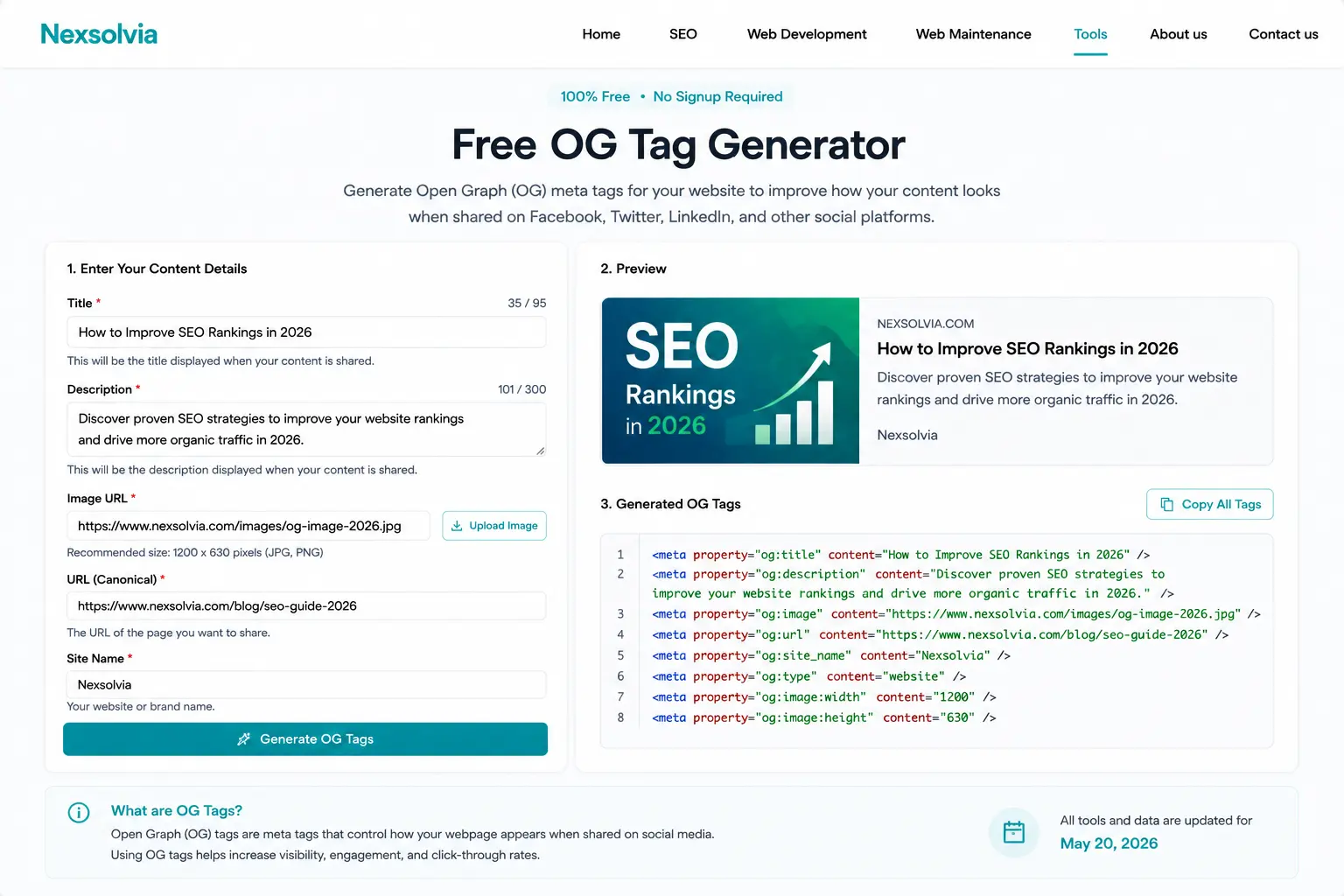
Our free OG tag generator in action — create Open Graph and Twitter Card tags with live social preview.