
Create Free Meta Title & Description – SEO Meta Generator Tool
Create title tags and meta descriptions that get clicks and help Google understand your page. Our free meta generator tool checks character limits, suggests keywords, and works for any website. No signup needed.
Enter a keyword or paste your URL. We will generate SEO titles and descriptions for you.
How to Generate Meta Tags in 3 Simple Steps
You do not need technical skills. Just follow these steps.
- Type your keyword or URL. If you paste a link, the tool will read that page and suggest tags based on its content.
- Click Generate. Our AI will create several title and description options. Each title stays under 60 characters and each description under 160.
- Copy and paste. Use the output directly in your SEO plugin like Yoast, Rank Math, or any CMS. That is all.
You can generate unlimited tags. No account, no hidden fees.
Everything You Need from a Free Meta Generator Tool
AI Powered Suggestions
Our tool reads your keyword or webpage and writes clickable titles and descriptions. You get multiple variations so you can pick the best one.
Character Limit Checker
Google cuts off titles longer than 60 characters and descriptions longer than 160. We show you the length in real time and warn you before that happens.
Works Anywhere
The output works with WordPress, Shopify, Wix, Squarespace, or any HTML website. No plugin required. Just copy and paste.
Bulk Generation
Generate meta tags for multiple pages in one go. Perfect for e‑commerce stores with hundreds of products.
What Is a Meta Title? (And Why It Matters)
A meta title is the blue headline people see on Google search results. It is also called a title tag or SEO title. The meta description is the short paragraph below the headline. Together, they decide whether someone clicks your link or scrolls past.
Some people confuse meta title with H1. The H1 is the big headline on your actual webpage. They do not have to be the same. In fact, keeping them different helps you target more keywords. For example, your H1 could be “10 Easy Bread Recipes” while your meta title is “Easy Bread Recipes for Beginners | Baking Tips”. Both work together.
In 2026, Google AI Overviews also read your meta tags. A clear, keyword‑rich description increases the chance that your page gets cited inside AI answers. That means better visibility without paying for ads.
📏 How Long Should a Meta Title Be?
Keep your meta title between 50 and 60 characters. Google measures pixels, not characters, but 60 characters is safe for 95% of devices. Descriptions should be between 120 and 158 characters. Our tool checks both automatically.
Real Meta Title Examples That Get Clicks
Here are examples from pages that rank well. Use them as templates when you write your own.
| Page Type | Example Title (50-60 characters) | Why It Works |
|---|---|---|
| Blog Post | How to Bake Sourdough | Easy Recipe for Beginners | Includes keyword “sourdough” and benefit “easy” |
| Product Page | Men’s Waterproof Hiking Boots | Free Shipping | Shows product + unique selling point (free shipping) |
| Service Page | SEO Agency for Small Business | Get More Traffic | Targets audience + result |
| Category Page | SEO Tips 2026 | Improve Google Rankings Today | Includes year and action verb |
8 Meta Title Mistakes That Kill Your Clicks
Avoid these common errors. Our tool helps you catch them before you publish.
- Title too long. Over 60 characters gets cut off. Users see “Best Coffee Makers 2026 …” and do not click.
- Missing primary keyword. Google needs to know what your page is about. Put the keyword near the start.
- Duplicate titles on every page. Each page needs a unique title. Duplicates confuse Google.
- Keyword stuffing. “Best coffee best coffee maker best coffee machine” looks spammy. Google ignores it.
- Not matching search intent. If someone searches “buy coffee maker”, do not write “how to clean a coffee maker”.
- Forgetting your brand. Add your brand name at the end, e.g., ” | Nexsolvia”. It builds trust.
- Ignoring mobile users. Mobile shows fewer characters. Check how your title looks on a phone.
- No emotional hook. Power words like “Easy”, “Fast”, “Proven”, or “2026” increase click‑through rates.
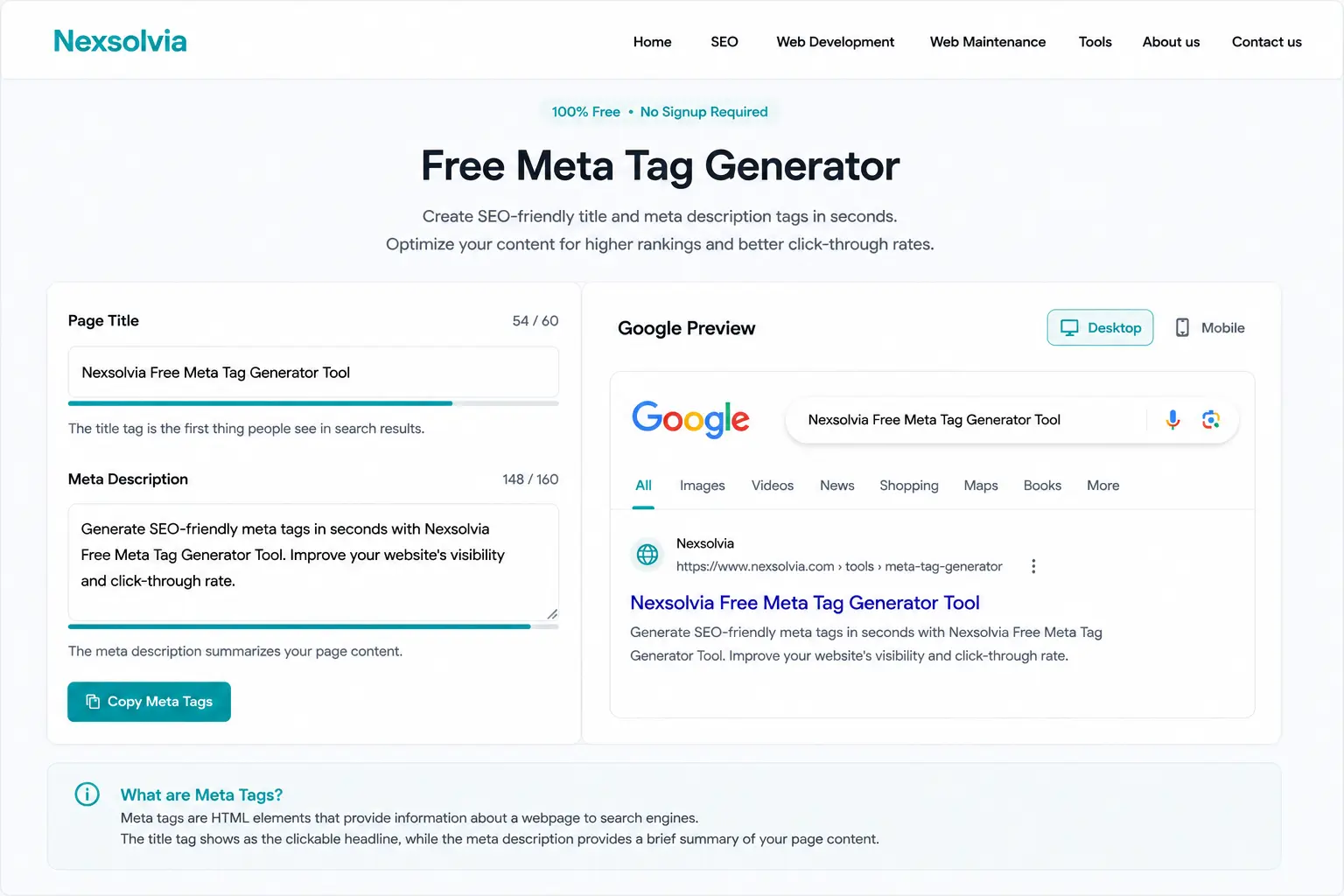
Our meta generator tool in action — real‑time title and description creation with character limit warnings.
3 Ways to Create SEO‑Optimized Meta Titles
Pick the method that fits your skill level and time.
1. Use Our Free Tool (Fastest)
Enter a keyword or URL. Get 5‑10 title and description options in seconds. Best for beginners and busy site owners.
2. Write Manually
Open your SEO plugin (Yoast, Rank Math). Write a title under 60 characters, description under 160. Include your main keyword near the start. Add your brand at the end.
3. Research Competitors
Search Google for your target keyword. Look at the top 5 results. Notice patterns in length, tone, and keywords. Then write something similar but better.
For best results, use our tool to generate ideas, then tweak manually. You get speed and control.
Use the Same Tool for YouTube, Instagram, Shopify, and Blogs
You are not limited to websites. Our meta tag generator works across different platforms because the rules are almost the same: keep titles short, put keywords early, and write for humans first.
For YouTube: Video titles under 60 characters perform best. YouTube shows the first 55‑60 characters on mobile, so put the most important words at the front. Use numbers and power words like “Easy” or “Step by Step”.
For Instagram: When you add a website link in your bio, the meta title of that page appears in Google search. A good title helps people find your Instagram content through search engines.
For Shopify and e‑commerce: Product pages need unique titles that include the product name, brand, and a benefit like “Free Shipping” or “2‑Year Warranty”. Our tool can generate these in bulk.
For blogs (WordPress, Blogger, Medium): Every blog post needs a unique meta title and description. This is the easiest way to improve your SEO ranking without changing anything else on the page.