
Free Robots.txt Checker,
Tester and Validator Tool
Most people never test their robots.txt file until traffic drops. This free robots.txt validator tells you if anything blocks Crawlers. Takes 10 seconds.
Paste your website URL to check robots.txt file now. No signup.
Robots.txt Validator
Enter a domain to check its robots.txt file and see blocked/allowed paths.
How to Check Robots.txt File of a website in 3 Steps
You don’t need to be a tech expert. Just follow these steps to run a robots.txt validator online.
- Type your domain – Put your website address in the box above. Like “https://yoursite.com”.
- Click Check Our robots.txt validator tool fetches your live robots.txt file from your server.
- See the results Red or orange lines mean trouble. Fix them before Google’s next crawl.
You can test robots.txt for unlimited sites. No account needed. That’s the simplest robots txt test tool you’ll find.
What This Robots.txt Tester Does For You
Check robots.txt rules
We read every Allow and Disallow line. If something blocks important pages, we flag it.
Sitemap checker
Your robots.txt file should list your sitemap. We verify it’s there and correct.
User-agent review
Googlebot, Bingbot, AI bots. We check if you accidentally blocked the wrong crawler.
Danger flag detection
Global Disallow, missing sitemap, broken rules. our robots.txt validator finds them fast.
What Is a Robots.txt File? One Mistake Can Remove Your Site From Google
A robots.txt file is a simple text file at yourdomain.com/robots.txt. It tells Google which pages to crawl and which to ignore. Google looks at this file first when it visits your site.
When used the right way, robots.txt saves your crawl budget. It stops Google from wasting time on admin pages, login pages, or duplicate content. That means Google spends more time on your real pages the ones that bring traffic.
But when it’s wrong? Disaster. A single line Disallow: / under User-agent: * – blocks every search engine from every page. This happens all the time during site moves or developer updates. And you won’t notice until traffic drops weeks later.
Google uses AI Mode and AI Overviews in 2026. If your robots.txt blocks pages, those pages can’t show up in AI answers either. So a proper robots.txt validator is more important than ever.
⚠️ The Most Dangerous Line in SEO
Disallow: / under User-agent: * blocks every crawler from your whole site. It looks small but kills your rankings. Our robots.txt checker flags this instantly before Google does.
Robots.txt Syntax What a Good File Looks Like
You don’t need to memorize everything. But knowing the basics helps you use any robots.txt tester or validator.
Basic structure
A robots.txt file has blocks. Each block starts with a User-agent line (which crawler this rule is for), then Allow or Disallow lines (what they can or can’t access).
✅ Correct example – common WordPress setup
User-agent: *
Disallow: /wp-admin/
Allow: /wp-admin/admin-ajax.php
Sitemap: https://yoursite.com/sitemap_index.xml
This blocks admin folders but lets important plugins work. And it shows Google your sitemap.
❌ Dangerous – blocks your whole site
User-agent: *
Disallow: /
This small file makes your site invisible to Google. Any good robots.txt tester will flag this red.
Simple rules to remember
User-agent: *means all crawlers. Use “Googlebot” for only Google.Disallow: /blocks everything.Disallow: /secret/blocks only that folder.- Paths are case-sensitive –
/Admin/is different from/admin/. Sitemap:line is optional but helps Google find new pages faster.- Comments start with
#– Google ignores them.
3 Ways to Validate Your Robots.txt File
You have 3 options for robot.txt validation. Pick what works for you.
1. Fastest Use our free robots.txt validator
Enter your domain in the tool at the top. Our online robots.txt tester fetches your live file and shows you problems in seconds. No signup, no limits. Best way to check robots.txt before publishing changes.
2. Manual check in your browser
Open a new tab. Type yoursite.com/robots.txt. If you see text, your file exists. Read it. Look for Disallow: / under User-agent: *. If you get a 404 error, you have no robots.txt file – that means Google crawls everything (not always bad, but not ideal).
3. Google Search Console robots.txt tester
Go to Google Search Console. Click Settings → robots.txt. Google’s own robots.txt tester shows your file and lets you test any URL. This is the most accurate because it uses Google’s own crawler. Use it as your google robots txt checker.
For best results, use all three: our tool for speed, manual for quick look, and Google for official confirmation.
7 Robots.txt Mistakes That Kill Rankings
These mistakes happen more than you think. Our checker catches them all.
- Global Disallow –
Disallow: /underUser-agent: *blocks everything. First thing to check when traffic dies. - Blocking CSS and JavaScript Google needs these to see your site properly. Block them and Google sees a broken page.
- Missing sitemap reference – Without the Sitemap line, Google still finds your sitemap but slower. Adding it speeds things up.
- Blocking pages that bring traffic – Some people block /blog/ thinking it helps. If those pages rank, they disappear from Google.
- Conflicting Allow and Disallow – When both apply, the more specific rule wins. Test each URL after changes.
- Wrong capitalization for User-agent “Googlebot” and “googlebot” are different. Use the exact format.
- Not testing after deployment Staging sites often have
Disallow: /. If that file goes live, you’re in trouble. Always run a robots.txt check after any site move.
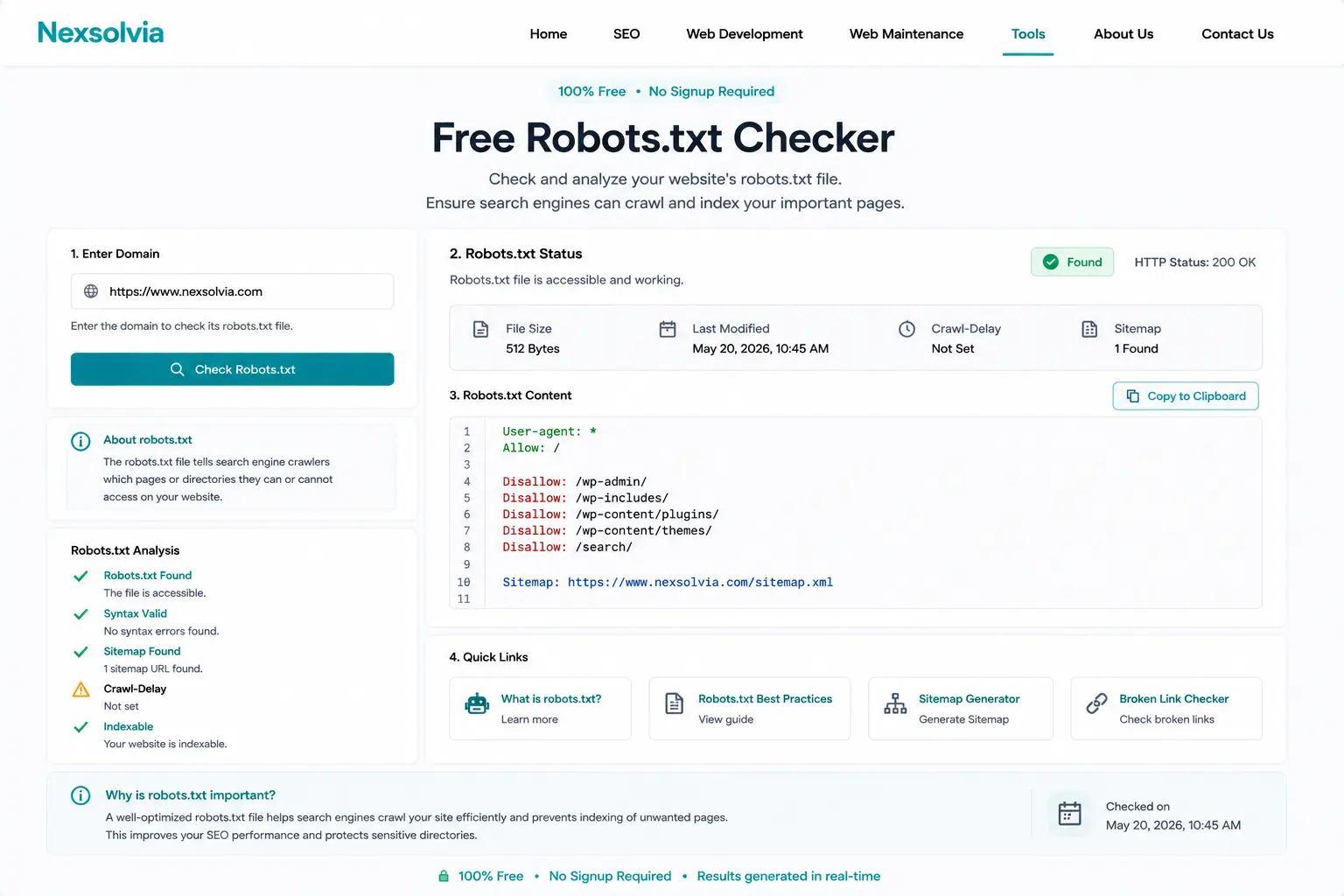
Our robots.txt validator dashboard – shows every rule and flags problems instantly.