
Free Keyword Suggestion Tool, Find Keyword Ideas & Suggestions Instantly
Finding the right keywords shouldn’t be hard. This free keyword suggestion tool gives you keyword ideas, keyword suggestions, and search volume data in seconds. Whether you need a quick keyword finder or a full keyword research tool, just type a topic and get suggestions no signup, no limits, completely free online.
Free Keyword Research Tool
Find high volume, low competition keywords in seconds. Discover profitable keyword ideas to rank higher and drive targeted traffic to your website.
Have suggestions or want to add something? Your feedback helps us improve this tool for everyone.
If you've got 30 seconds, leave us a quick review on Google 🌟 and keeps us motivated to build more.
How to Find Keyword Suggestions in 3 Simple Steps
You do not need to be an SEO expert. Follow these steps to get keyword ideas that bring traffic.
- Enter a seed keyword. Type any topic related to your business “digital marketing” or “best coffee maker”.
- Click Search. Our free keyword suggestion tool finds hundreds of related keyword ideas with search volume data.
- Pick your keywords. Look for high volume, low competition terms. Add them to your content plan and start writing.
You can search unlimited times. No account needed. This is the best free keyword suggestion tool online for small businesses and bloggers who need keyword ideas fast.
Keyword Suggestion Tool Get Hundreds of Keyword Ideas in One Click
What makes a great keyword suggestion tool? Speed and relevance. You type one word or phrase, and the tool returns dozens of keyword suggestions your audience is actually searching for on Google right now. No waiting, no complicated setup, no paid subscription.
Our free keyword suggestion tool works differently. It does not just give you random words. Every keyword suggestion comes with search volume, competition level, and cost-per-click data. That means you know immediately which keyword ideas are worth targeting and which ones to ignore. Get keyword suggestions for blog posts, product pages, YouTube videos, or local SEO the tool handles all of it.
Many search term suggestion tools lock their best features behind paywalls. This one does not. You get full access to keyword suggestions, long tail keyword ideas, and SEO keyword suggestion data all free online, no signup required. Try it once and you will see why thousands of site owners use it as their go-to keyword suggest tool every day.
Everything You Need from a Free Keyword Ideas Tool
Search Volume Data
See how many people search for each keyword suggestion every month. Focus on keyword ideas that actually have an audience.
Keyword Difficulty Score
Know which keyword suggestions you can rank for. Target low difficulty terms first to build traffic fast.
Long Tail Keyword Suggestions
Find specific phrases that convert better and rank faster. Great for new websites looking for keyword ideas.
CPC & Commercial Intent
See which keyword suggestions have buyer intent. High CPC means people are ready to buy.
Keyword Finder Quickly Find Similar Keywords and Related Terms
Sometimes you already have a keyword in mind but you want to find similar keywords or related keywords that bring even more traffic. That is exactly what a keyword finder tool does. Enter your keyword and instantly find keywords that are related, similar, or complementary.
Our free keyword finder helps you find keywords your competitors might be using but you are missing. It also helps you find keyword ideas for long tail variations that rank faster. Whether you are finding keywords for a new blog post, a product description, or a local service page, this keyword finder tool gives you the complete picture in one search.
Finding keywords manually by typing guesses into Google takes hours. With this tool, finding keywords takes seconds. Just enter a topic and the tool finds keywords, finds similar keywords, and finds related keywords all in one go. If you are looking for a free keyword finder that actually shows search volume and difficulty, this is the one to use.
AI Keyword Research Tool Find Keywords That Work in 2026
Search is changing fast. In 2026, Google AI Mode and AI Overviews are pulling answers directly into search results. That means traditional keyword research is not enough anymore. You need an AI keyword research tool that understands what both humans and AI algorithms are looking for.
Our AI keyword research tool finds question based keywords, topic clusters, and search intent patterns that Google AI systems prefer. When you target “how to” keywords, “what is” phrases, and clear informational keyword suggestions, your content has a better chance of appearing in AI generated answers. That means visibility without paying for ads just smart keyword research.
This free online keyword research tool gives you the same data that expensive paid tools offer but without the monthly bill. Use it for keyword research AI applications like content strategy, competitor analysis, and finding keyword gaps. Keyword research tools free online rarely offer this depth. This one does and it is completely free, with no signup needed.
What Is Keyword Research and Why Is It the Foundation of SEO?
Keyword research is the process of finding out what words and phrases people type into search engines. It tells you what your customers want. Without it, you are writing content that nobody is looking for. A free keyword suggestion tool makes this process easy you type a topic and get keyword ideas with search volume and competition data instantly.
A good keyword research tool online shows you search volume, competition, and related keyword ideas. This data helps you decide what to write about first. You can target keyword suggestions that have decent traffic but low competition. That is how small websites grow by finding keyword ideas that big sites overlook.
Once you have your keyword suggestions, use our Meta Tag Generator to write titles and descriptions that include your target terms. Then check how your page looks on Google with our SERP Preview Tool. For more on how search works, check Google’s official SEO starter guide.
3 Types of Keyword Suggestions Every SEO Tool Should Show You
Not all keyword ideas are the same. A good keyword suggestion tool helps you find three main types.
1. Head Keywords (Short, High Volume)
These are one or two word phrases like “coffee maker” or “SEO tools”. They have high search volume but also high competition. Big websites rank for these. New websites should use them as topic ideas, not primary targets.
2. Long Tail Keyword Suggestions (Specific, Lower Competition)
These are longer phrases with three or more words like “best coffee maker under 100 dollars” or “free keyword suggestion tool for small business”. They have lower search volume but much less competition. They also convert better because the person searching knows exactly what they want.
3. Question Keywords (Who, What, Where, Why, How)
These start with question words. Examples: “how to do keyword research”, “what is a keyword suggestion tool”, “why is SEO important”. Google AI Overviews love these. If you answer the question clearly, Google may show your content inside AI answers.
Our free keyword research tool finds all three types. You can filter by question words, search volume, or competition level.
7 Keyword Research Mistakes That Kill Your Traffic
These are the most common errors people make when using a keyword suggestion tool. Avoid them and you will rank faster.
- Targeting keyword ideas that are too hard. If every big website ranks for a term, you will not beat them. Pick keyword suggestions with low difficulty scores first.
- Ignoring search intent. Are people looking to buy, to learn, or to find a specific website? Match your content to what they actually want.
- Only targeting head keywords. High volume looks good but rarely converts well. Long tail keyword suggestions bring buyers.
- Not checking search volume. A keyword suggestion might sound good but have zero searches per month. Do not waste time on dead terms.
- Stuffing keywords everywhere. Google is smarter now. Write for humans first. Use keyword ideas naturally.
- Forgetting local keywords. If you serve a specific city, add the city name to your keyword suggestions. Example: “plumber in Lahore” not just “plumber”.
- Never updating keyword research. Trends change. What worked last year may not work now. Run new keyword research every few months.
Our free keyword suggestion tool helps you avoid these mistakes by showing search volume, difficulty, and intent for every keyword idea.
3 Ways to Get Keyword Suggestions Free Online Methods
You have options. Pick what works best for your time and budget.
1. Use This Free Online Keyword Suggestion Tool (Fastest)
Enter any seed keyword. Get hundreds of keyword suggestions with search volume and difficulty scores. No signup, no limits. Best for beginners and busy site owners who need keyword ideas fast.
2. Check Google Search Suggestions
Type a word into Google and look at the autocomplete suggestions. Also check “People also ask” and “Related searches” at the bottom of the page. These are real keyword ideas that real people search for. This method is free but slower than using a dedicated keyword suggestion tool.
3. Analyze Competitor Keywords
Look at what keyword suggestions your competitors rank for. You can do this manually by checking their page titles, headings, and content. Or use our tool to enter their URL and see what keyword ideas they target.
For best results, use this free keyword suggestion tool to generate keyword ideas first. Then check Google suggestions to see what real people type. Combine both methods for the most complete keyword list.
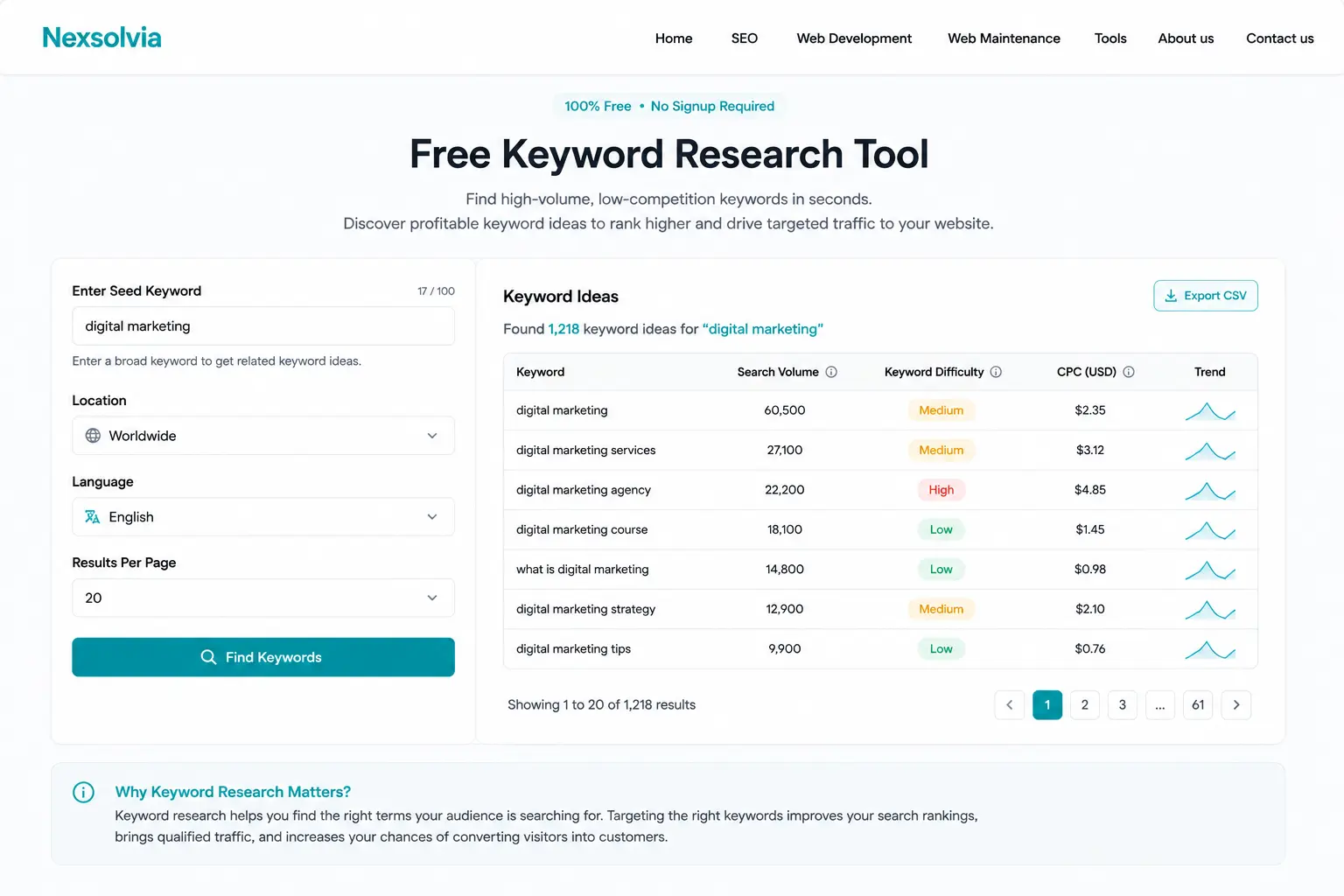
Our free keyword suggestion tool in action, search volume, difficulty score, and keyword ideas at a glance.